7 Must-Have Apps for Japan Travel in 2026
Japan is one of the easiest countries in the world to travel independently, and one of the most confusing to travel unprepared. The must-have apps for travel in Japan are the ones that quietly solve the four problems every visitor runs into: navigating a rail network with 13 lines under one station, reading a menu with no pictures, paying without fumbling for coins, and getting into attractions that sold out three weeks ago.
This guide covers the seven apps visitors actually keep on their home screen after the first week: what each is good at, where it lets you down, and how much data it needs.
Quick Answer (TL;DR)
If you install nothing else before you fly, install these:
- Google Maps for everyday navigation, walking directions and train transfers
- Google Translate for menus, labels, signs and conversations
- Japan Travel by NAVITIME for serious rail planning, platform numbers and rail-pass routing
- Welcome Suica Mobile (iPhone) for tap-to-ride transport and tap-to-pay shopping
- Smart EX for booking shinkansen seats on the Tokyo to Kyoto, Osaka and Hiroshima route
- GO for hailing a taxi in English anywhere in Japan
- Klook for attraction tickets, timed-entry passes and airport transfers
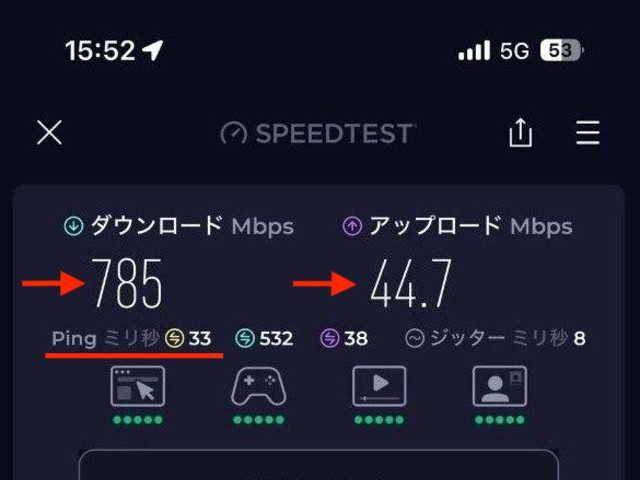
One thing links all seven: almost every function that matters happens in real time. Live departure boards, camera translation, QR tickets, and taxi dispatch all require a reliable data connection, so arranging an eSIM before you fly is worth 10 minutes of your time.
Why These Apps Can Make Your Japan Trip Much Easier
Japan has digitized the parts of travel that used to involve queuing. That is good news, but it means your phone now does jobs a paper ticket, a ticket office and a hotel concierge used to do.
Navigation. Addresses in Japan are not sequential along a street, and even locals navigate by landmarks and station exits. A map app that knows which of Shinjuku Station's 200-plus exits you need is not a luxury.
Trains and subways. Tokyo alone has JR lines, two subway operators and several private railways, each with its own gates and fares. The right route is often not the shortest one on the map, it is the one with a transfer you can actually make in four minutes with a suitcase.
Translation. English signage at major stations is excellent. English on a ramen vending machine in a side street, or a medicine box in a pharmacy, is not.
Payment. Japan is far more cashless than it was five years ago, but the dominant method is not a credit card, it is an IC transport card tapped on a reader. Your phone can be that card.
Bookings. Popular attractions now sell dated, timed-entry tickets online only, and many sell out weeks ahead. Shinkansen seats are the same in peak season.
The 7 Best Apps for Japan Travel
Every app below is free to download, available in English, and used by real travelers rather than only recommended in listicles.
1. Google Maps
Google Maps is the default map app for most visitors, and in Japan it is stronger than people expect. Transit directions include the line name, platform number, departure time, fare, and the station exit to use, covering about 80 percent of a normal day.
It also handles the small stuff: opening hours that are usually accurate, busy-times data, and English reviews that tell you whether an unmarked doorway is a cocktail bar or someone's front door. Drop pins on everything you want to see before you fly, and your daily route plans itself. In huge stations like Shinjuku, Umeda, or Tokyo, it can completely lose you because what you need there is the right underground passage, not the right street.
Key features
- Door-to-door transit routing with platform numbers and fares
- Live train and bus departure times
- Downloadable offline maps for a city or region
- Walking directions with station exit numbers
- English reviews, opening hours, and saved lists for planning
Best for: first-time visitors, families, anyone who wants one app for everything
Platforms: iOS, Android
Price: Free
2. Google Translate
Google Translate is the app you will open more often than you expect, and rarely for conversation. Camera mode is the workhorse: point your phone at a menu, an ingredient list, or a station notice and the Japanese is replaced by English on screen.
The realistic scenarios are mundane and important. Checking whether a dish contains dashi or pork. Reading a pharmacy box when you have a cold. Working out which button on the hotel washing machine means "start". Conversation mode covers the rest, and most staff will happily lean in and speak into your phone.
Download the Japanese offline pack before you leave home. Offline translation is rougher, and the camera mode is weaker without a connection, but it will save you underground or in a rural valley with no signal.
Key features
- Camera translation for menus, labels and signs
- Two-way conversation mode and handwriting input for kanji
- Offline Japanese language pack
- Saved phrases for things you repeat, such as dietary restrictions
Best for: solo travelers, food-focused trips, anyone with allergies or dietary needs
Platforms: iOS, Android
Price: Free
3. Japan Travel by NAVITIME
Japan Travel by NAVITIME is what you graduate to when Google Maps stops being enough. Built by a Japanese navigation company specifically for inbound visitors, it understands the rail network in a way general map apps do not.
The feature most travelers value is route filtering. Tell it you hold a JR Pass or a regional pass and it shows routes your pass actually covers, instead of routing you onto a private railway you would have to pay for separately. It also gives full timetables, station lists, platform numbers and which car to board for the fastest transfer.
The offline spot search is a genuine safety net: nearby ATMs that accept foreign cards, coin lockers, free Wi-Fi points and tourist information centers. Route searches themselves still need a connection, because delays and platform changes are live data.
The app is free, with optional Premium plans starting at around ¥600 for a few days (roughly 3.80 USD) and about ¥1,100 per month (roughly 7.0 USD), which add nationwide timetables, additional stops, voice navigation, and ad-free use.
Key features
- Rail-pass aware route search, including JR Pass filtering
- Platform numbers, train car guidance and full timetables
- Offline spot search for ATMs, lockers and Wi-Fi
- Itinerary planner that orders your saved places sensibly
Best for: independent travelers, rail-pass holders, multi-city itineraries
Platforms: iOS, Android
Price: Free, with optional Premium from about ¥600 for a few days (roughly $3.80 USD) and about ¥1,100 per month (roughly $7.0)
4. Welcome Suica Mobile
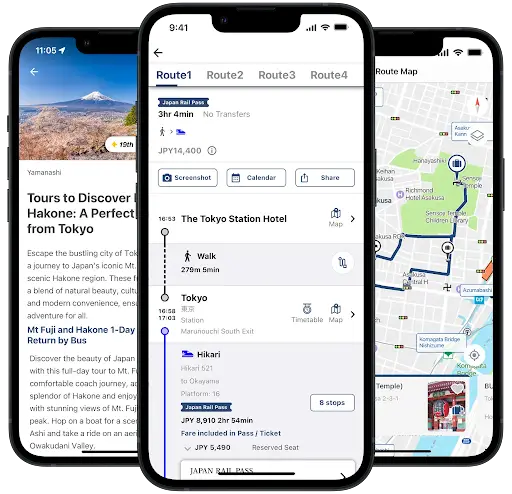
Suica is Japan's prepaid IC card. You tap it at train and bus gates, and at convenience stores, vending machines, coin lockers, and thousands of shops. Welcome Suica Mobile is JR East's version for visitors, and it removes the two things tourists used to hate: queuing at a machine and topping up with cash.
Setup takes a few minutes. You issue the card inside the app with an overseas credit card, top it up whenever you like, and tap your phone at the gate. It stays valid for 180 days, with no deposit. It also links to JR East Train Reservation, so you can book Shinkansen and limited express seats, plus Green Car (first class) tickets on local lines such as the one to Narita Airport, then board by tapping the same phone.
Two honest limitations. It is iPhone-only: standard Mobile Suica requires Japanese FeliCa hardware, which almost no overseas Android phones have, so Android users should buy a physical card instead (a plain Suica or Pasmo costs a ¥500 deposit (about $6), all of it usable as fare, and lasts 28 days). Second, any balance left when the digital card expires is not refunded, so do not load ¥20,000 on your last day.
Key features
- Digital Suica issued in the app, no counter and no deposit
- Top up with an overseas credit card at any time, valid for 180 days
- Works nationwide on trains, subways, buses, and in shops
- Shinkansen and limited express e-tickets linked to the same card
- Real-time train status and travel information
Best for: iPhone users, first-time visitors, families who hate queues
Platforms: iOS only (Android users: buy a physical Suica, Pasmo or ICOCA)
Price: Free to download, you pay only what you load
5. Smart EX
Smart EX is the official booking app for the Tokaido, Sanyo, and Kyushu Shinkansen, which is to say, the lines almost every visitor uses: Tokyo, Nagoya, Kyoto, Osaka, Hiroshima, and Hakata.
Booking takes about two minutes. Pick a train, choose your seat from a seat map, pay with your card, then board by scanning a QR code or, better, by tapping the IC card registered to your account. A reserved seat on a Nozomi from Tokyo to Kyoto runs roughly ¥13,000 to ¥14,500 (about $82 - $92) depending on the train and season; you can reserve up to a year in advance, and changes before departure are free.
The catch is registration, and it is worth handling at home. Smart EX runs every card payment through 3D Secure authentication, and foreign cards not enrolled in it fail at signup. Sorting that out on your sofa is far easier than doing it at Tokyo Station with a train to catch.
One 2026 change worth knowing: the round-trip discount was withdrawn on 31 March 2026, so book each direction as a separate one-way and look for the EX Hayatoku early-booking fares instead, which are usually the cheapest legitimate way to ride a Nozomi.
One point that confuses people: Smart EX does not cover JR East lines. For the Tohoku, Hokuriku, Joetsu and Hokkaido shinkansen, use JR-EAST Train Reservation or Welcome Suica Mobile instead.
Key features
- Reserved and non-reserved seats on Tokaido, Sanyo and Kyushu Shinkansen
- Seat map selection, including window seats with a Mount Fuji view
- Board with a QR code or a registered IC card, no paper ticket
- Free changes before departure and early booking discounts
- English interface and support
Best for: anyone doing Tokyo to Kyoto or Osaka, business travelers, peak-season trips
Platforms: iOS, Android
Price: Free app, you pay the fare
6. GO (Taxi App for Japan)
GO is Japan's dominant taxi app, covering all 47 prefectures and roughly 80 percent of taxi-app usage time in the country. If you need a car, this is the one that will actually find you a driver.
Taxis are not an everyday tool in Japan, but there are moments when they are the only sensible option: you have missed the last train, you are carrying luggage in the rain, or you have a 6 am flight. GO handles all of these in English, shows an estimated fare before you book, and lets you pay in-app through GO Pay with an international credit card or Apple Pay. When your app is set to English, the driver will be notified and will simply check the confirmation number on your screen.
Two practical warnings. Registration uses SMS verification, and a data-only travel eSIM cannot receive that code, so verify your number before you leave home, or use the passport-and-selfie route the app offers. And areas immediately around big stations are often no-pickup zones, so walk a block before requesting a car.
Key features
- Nationwide coverage including Hokkaido, Kyoto, Osaka, Fukuoka and Okinawa
- English interface and non-Japanese phone numbers accepted
- International credit cards and Apple Pay via GO Pay
- Fare estimate before you book, plus advance booking
- Flat-rate airport transfers in major cities
Best for: late nights, families with luggage, business travelers, rural sightseeing
Platforms: iOS, Android
Price: Free app, you pay the metered fare
7. Klook
Klook is a booking platform rather than a travel tool, and it earns its spot because of one modern reality: many of Japan's best attractions no longer sell tickets at the door.
Timed-entry venues such as teamLab, theme parks like Universal Studios Japan, observation decks, day tours, airport transfers, and luggage delivery are all bookable in advance, in English, in your own currency. You get a QR voucher on your phone, scan it at the entrance, and skip the ticket queue. For a family trip where one sold-out attraction can wreck an afternoon, that certainty is worth a lot.
Use it selectively. Prices are not always better than booking direct, and some vouchers still need to be exchanged for a physical ticket at a counter, which is exactly the queue you were trying to avoid.
Key features
- Timed-entry tickets for popular attractions and theme parks
- Airport transfers, day tours and rail passes
- QR vouchers stored in the app
- Pay in your home currency, with free cancellation on many bookings
Best for: families, couples, short trips with a packed schedule
Platforms: iOS, Android
Price: Free app, you pay per booking
How Much Data Do These Apps for Travel in Japan Actually Use?
Data use is the question nobody asks until their plan runs out on day four. The figures below are rough planning estimates from typical tourist use, not lab measurements, but they are close enough to size a plan.
| App | What consumes data | Rough use per day | Works offline? |
|---|---|---|---|
| Google Maps | Map tiles, live transit, reviews | 40 to 80 MB | Partly. Offline maps work, transit and live times do not |
| Google Translate | Camera translation, voice | 10 to 40 MB | Partly, with the offline pack installed |
| Japan Travel by NAVITIME | Route searches, live delays | 20 to 40 MB | Partly. Offline spot search and saved routes only |
| Welcome Suica Mobile | Top-ups, ticket sync | 2 to 5 MB | No. Gate tapping works, but top-ups need data |
| Smart EX | Booking and changes | 2 to 5 MB | No |
| GO | Live map, dispatch, payment | 10 to 25 MB on days you ride | No |
| Klook | Browsing, voucher loading | 20 to 60 MB | Partly. Save vouchers as screenshots |
| Everything plus normal messaging | - | 300 to 600 MB | - |
For most travelers, that means roughly 3 to 5 GB for a ten-day trip, and more if you upload photos and videos to social media as you go.
Apps That Need a Reliable Internet Connection
Look again at the table, and a pattern appears: nearly everything on that list is real-time by design.
Google Maps needs a connection for the departure leaving in three minutes. Translation is much better online than offline. NAVITIME needs live data to warn you that your line is suspended. QR tickets in Klook and Smart EX have to load. GO has to dispatch a car to your exact position. Welcome Suica Mobile needs data to top up your balance, which is exactly the moment you need it, standing at a gate with ¥180 left.
Station Wi-Fi is available and fine for checking email. It is not reliable at 10:40 pm when you have missed a connection and need a taxi.
Whichever combination of these apps you end up using, all of them are more useful with a stable mobile connection. That is why many travelers now arrange an eSIM at home, so that everything works from the moment the plane doors open, without hunting for airport Wi-Fi or queuing at a rental counter. Awinst Connect Japan travel eSIM is one such option, with plans sized for short trips and longer stays.

Download Before Departure: A 10-Minute Checklist
Do these at home, on your own Wi-Fi, with your bank reachable by phone if something goes wrong.
- Install all seven apps and sign in to each one
- Download the Japanese offline pack in Google Translate
- Download an offline Google Map of Tokyo, Kyoto and anywhere else you are staying
- Register your Smart EX account and confirm your card passes 3D Secure
- Verify your phone number in GO while you can still receive SMS
- Issue your Welcome Suica in the app (iPhone) or plan where to buy a physical IC card
- Complete Visit Japan Web and screenshot your QR code for immigration and customs
- Screenshot every booking voucher and confirmation
- Install and activate your eSIM, and check it connects on landing
FAQ
Which app is best for trains in Japan?
Google Maps is enough for daily city travel. For long-distance planning, rail pass routing, and full timetables, Japan Travel by NAVITIME offers more detail. Many travelers use both.
Is Google Maps enough in Japan?
For most trips, yes. It handles walking, subways, buses, and everyday transfers well, but it struggles inside very large stations and does not know which routes your rail pass covers. That is where NAVITIME helps.
Do I need Mobile Suica?
You need an IC card, and Suica on your phone is the easiest option. iPhone users should use Welcome Suica Mobile. Android users traveling from abroad will almost certainly need a physical Suica, Pasmo or ICOCA card, because overseas Android phones lack the required chip.
Which app should I use for taxis in Japan?
GO. It has by far the widest coverage, works in English, accepts international cards, and shows a fare estimate before you book. Uber operates in Japan too, but mostly dispatches the same taxis with less coverage.
Can I use these apps offline?
Only partly. Offline maps, saved routes, downloaded translation packs and screenshotted vouchers all work without data. Live departures, camera translation quality, taxi dispatch, ticket booking and IC card top-ups do not.
Should I install them before arriving?
Yes. App stores, account verification, SMS codes, and card authentication are all easier on home Wi-Fi than in an arrivals hall. Registration is the part that fails, not the app itself.
Do I need a Japanese phone number for these apps?
No. GO accepts non-Japanese numbers and the rest need only an email address. You do need a number that can receive SMS during GO's verification step, so do that before switching to a data-only travel eSIM.
Will my credit card work in these apps?
Usually, with one condition: Smart EX and JR East's booking services run payments through 3D Secure. If your card is not enrolled, registration fails. Enable it with your bank before you travel and carry a second card as backup.
Is Visit Japan Web an app?
No, it is a government website, not an app. You fill it in before departure and it produces a QR code for immigration and customs. It is optional in 2026, but it saves real time at Haneda, Narita and Kansai, where kiosks now scan the code and your passport in one step.
Conclusion
The most useful apps for travel in Japan are not the ones with the most features. They are the ones who remove a specific point of friction: a map that knows which exit to take, a camera that reads a menu, a phone that opens a ticket gate, a taxi that arrives without a phone call.
Install all seven before you fly, register the accounts that need verification, and download your offline maps and language pack while you still have easy Wi-Fi. Then make sure they can reach the internet from the moment you land, because that is what turns a folder of apps into an actual travel companion.
Buy eSIM for Japan - https://awinstconnect.com/esim-japan